AI Flash Filter
Give any photo the direct-flash look of a point-and-shoot camera: bright frontal light, a hard shadow behind you, a darker background and fine grain, with the same people and pose.
Free to use · Chat-style editing
Before and after
Made with this tool. Drag the handle to compare.
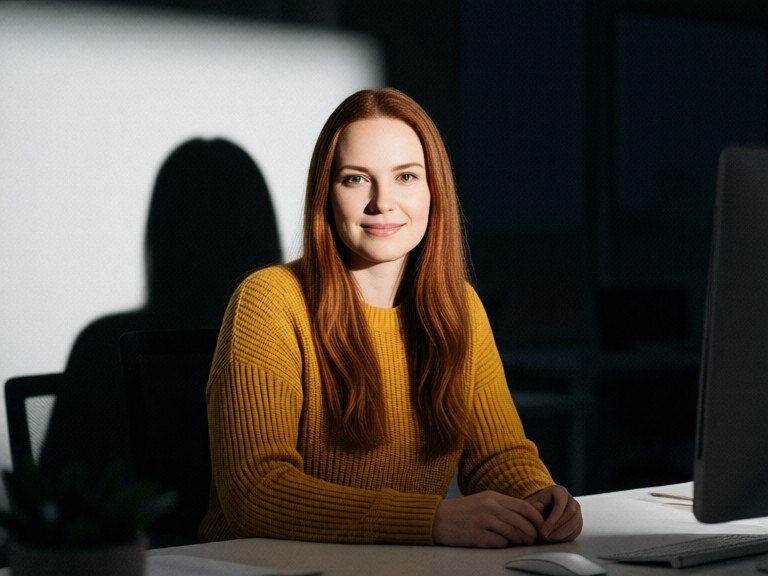
 BeforeAfter
How to use AI Flash Filter
1. Pick your options
Choose a style, upload an image if the tool asks for one, or type what you want.
2. Hit Generate
The AI does the work in seconds — free to use.
3. Download or copy
Save your result, copy it, or tweak the options and run it again.
Free to use · Works in your browser
What the flash filter does
The flash look comes from a small camera flash fired straight at the subject: the face and clothes are lit brightly from the front, skin gets crisp highlights, a hard-edged shadow falls on the wall just behind, and the background drops into darker, cooler tones because the flash never reaches it. Photos from compact digital cameras, disposables and party snapshots all share it. The AI flash filter relights your own photo that way instead of only shifting its colours, so the result reads as a real flash photo.
Flash styles to try
Leave the box empty for a classic direct flash. Or type a style: "night party flash" for a dark room behind a bright subject, "Y2K digicam" for a cool, crisp early-2000s compact camera, "disposable camera" for warm faded colour and heavier grain, "paparazzi flash" for a hard, glossy red-carpet snapshot, or "soft glam flash" for a gentler, flattering version. Add "subtle" or "strong" to set how far it goes.
Your photo stays your photo
Only light, shadow, colour and grain change. Faces, expressions, bodies, hair, clothes, pose and framing stay as they were, and nothing is added or taken out. Daytime and indoor photos both work; a person facing the camera gives the strongest flash look. For other moods, try the Aesthetic Photo Editor, AI Photo Filters, Vintage Photo AI or the Cinematic Photo Filter. Only upload photos you took or may use.