AI Ukiyo E Filter
Turn your photo into an ukiyo-e Japanese woodblock print: bold dark outlines, flat colour blocks, soft gradients and washi paper texture, with the same people, pets and scene.
Free to use · Chat-style editing
Before and after
Made with this tool. Drag the handle to compare.
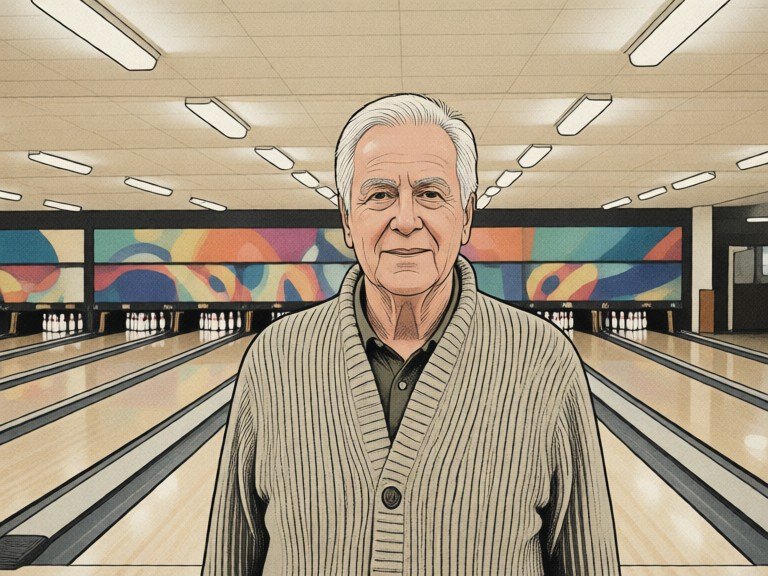
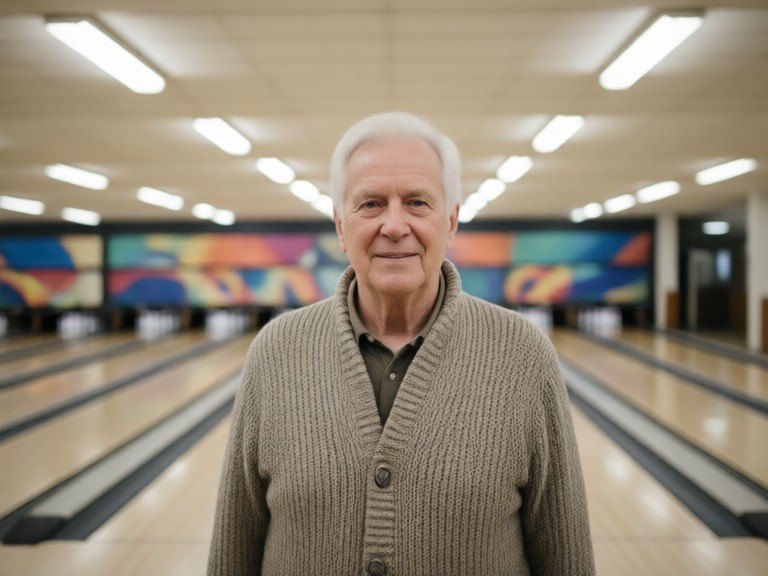 BeforeAfter
How to use AI Ukiyo E Filter
1. Pick your options
Choose a style, upload an image if the tool asks for one, or type what you want.
2. Hit Generate
The AI does the work in seconds — free to use.
3. Download or copy
Save your result, copy it, or tweak the options and run it again.
Free to use · Works in your browser
What the AI ukiyo e filter does
It redraws your photo as an ukiyo-e print, the Japanese woodblock art style of the Edo period. Shapes get bold dark outlines, colours become flat blocks with soft gradients, such as indigo sea, vermilion accents and pale cream sky, and the whole picture sits on textured washi paper with subtle carved-block marks. The people, pets, buildings and layout stay as in your photo, so it reads as your own scene printed in this style. It is an AI restyle of your picture, not a copy of any famous print.
Print styles to try
Leave the box empty for a classic print with strong outlines, flat colour and a soft sky gradient. Or type a look: "great wave sea" for stylised curling waves and a small mountain, "cherry blossom portrait" for pink blossoms and a calm pastel background, "rainy street" for diagonal rain lines and umbrellas, "mountain landscape" for layered hills and mist, "night festival" for lanterns on a dark indigo sky, or "muted vintage print" for faded, aged paper tones. Add "fewer colours" for a simpler three-colour print.
Tips for the best print
Clear shapes and strong contrast translate best, so sunsets, seas, mountains, city streets and portraits with simple backgrounds look great. For portraits, a clear, front-facing photo keeps the face recognisable. Pets and buildings work well too. If the result has too many details, add "simpler shapes" and run it again. For other art looks, try Pop Art Style AI, the Watercolor Art Creator, Oil Painting Style AI or Photo to Pencil Drawing. Only upload photos you took or may use.